About alert state reporting
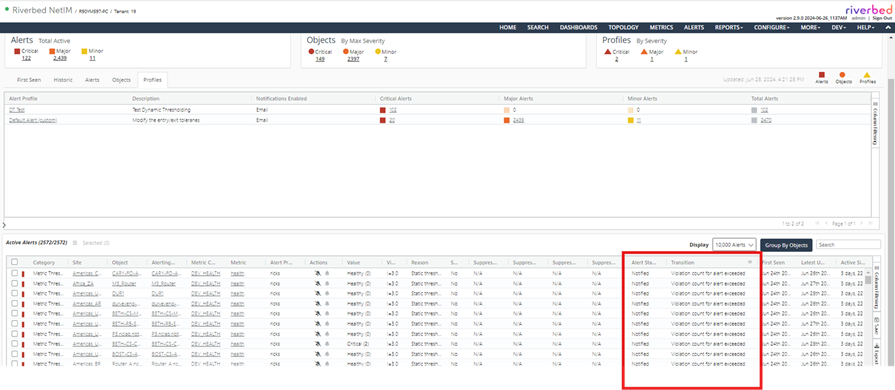
Each alert has a value for its current state and for the most recent transition. This provides clear information about the state of alerts. The alert state determines why notification messages were or were not sent.
The following states are possible:
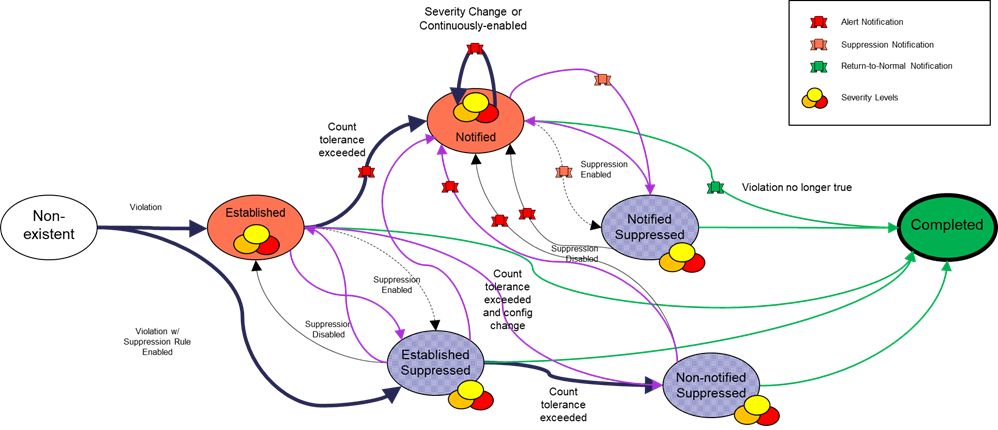
• Established: A sufficient number of in-violation samples have been received.
• Notified: Notification is configured for the alert’s profile and the alert has been active for equal to or greater than the profile’s Threshold Violation Tolerance.
• Notified Suppressed: After being notified, the alert was suppressed.
• Established Suppressed: After being established, the alert was suppressed.
• Non-notified Suppressed: Notification is configured for the alert’s profile and the alert has been active for equal to or greater than the profile’s Threshold Violation Tolerance, but the alert has been suppressed since its creation.
• Completed: The condition which triggered the creation of the alert has returned to normal.
The state diagram below shows the transitions between these states. It also shows when notification messages might be sent if they are configured for the profile.
Alert state diagram
The Alerts Manager and objects’ Alerts tab contain columns with the state and most recent transition.
Alert State and Transition columns