Examples of a device info file
The following figure shows an example of a device info file that can be used for a simple import. In this example, the file is being used to create initial device entries in NetIM, but is not being used to assign devices to device sets. If you want to populate the comments field, leave the deviceSets field empty (using consecutive delimiters).
To assign devices to device sets during import of a device info file, you must first create device sets in NetIM, and then export a device info file from NetIM to generate the necessary header information containing the NetIM-assigned IDs for the device sets as shown in
Figure: Example Exported Device Info File—Advanced Export.
The following figure shows an excerpt of an exported device info file created using advanced export. It contains all of the device entry fields even though not all are shown. The password and privilegedPassword fields (as well as the commString field that is not shown) in an exported device info file are populated with encrypted strings.
If you want to add a new device entry that has the same password as an existing device entry, you can simply copy and paste the encrypted string into the appropriate field in the new device entry.
Example Exported Device Info File—Advanced Export
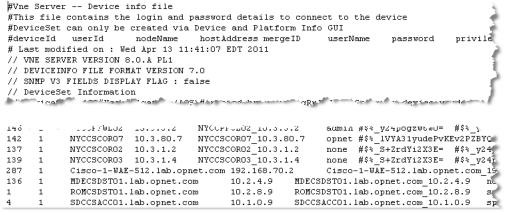
In the example shown in
Figure: Example Exported Device Info File—Advanced Export, Device Sets have been defined in NetIM and the mapping (of device set name to ID) is included in the header information of the exported device info file.
This information is required if you want to specify device sets during import of a device info file. You would use the header information in the following way:
• If a device is a member of one device set, enter the ID of that device set into the device set field. For example, if NYCCSCOR02 is the New York device set, you would enter a value of 3 into the device set field for NYCCSCOR02.
• If the device is a member of more than one device set, separate the device set IDs using a # sign. For example, if NYCCSCOR02 is a member of both the New York and East device sets, you would enter a value of 3#4 into the device set field for NYCCSCOR02.