SNMP trap management
SNMP Trap receiving occurs on the NetIM core; however, devices must be configured to send traps to the IP address of the NetIM core. NetIM allows you to control trap severity mapping and configure alerting and notification based on incoming SNMP traps. All supported SNMP traps are now mapped to a default severity and category. Additionally, system-defined global and OID-specific trap severity mapping rules are provided. Your administrator can redefine the trap category and severity by editing files as well as authoring and installing advanced trap rules on the NetIM core.
Configuring alerting based on Trap severity
Supported SNMP Traps can be mapped to one of the following severity levels:
• Critical = 5
• Major = 4
• Minor = 3
• Info = 2
• Cleared = 1
• Unknown = 0
You can then use the SNMP trap severity value to create minor, major, and critical alerts on the NetIM Alerts Profiles page. For more information, see
Configuring Metric Alerting.
Primary trap management files
The following table lists the files that control the NetIM trap handling behavior which are located on the NetIM core VM under the directory /opt/riverbed/NetIM/<version_build>/lib/xml/res:
Filename | Description |
trapList.res | Precompiled information for the 15,000 NetIM-supported SNMP traps. |
trapListVarBind.res | Precompiled information from the 15,000 NetIM-supported traps containing name-mapping of SNMP OID varbinds to friendly name. |
trapMappingSettings.res | Contains properties and their settings that control the behavior of the trap management including: • location of the default settings file • snmpTrap/defaultSettingsFile = <install-dir> /lib/xml/res/trapDefaultSettings.csv • Global Default Severity: • snmpTrap/severity/defaultSeverity = “Minor” • Global switch to allow use of trap severity mapping rules: snmpTrap/severity/Use Drools = "TRUE" • Root directory for trap severity mapping rules: snmpTrap/severity/trapSeverityDroolRuleRootDir = <install-dir>/lib/xml/rules/snmpTrap/severity |
trapDefaultSetting.csv | Contains the per trap default and custom settings for severity and category. |
Trap severity
To determine an incoming trap’s severity, NetIM trap management performs the following evaluation, in the following priority order, for each incoming trap:
1. a Custom OID-specific Trap Severity Mapping Rule (drool rule) matches the trap.
2. a Custom OID-specific default severity is assigned for the trap.
3. a system-defined OID-specific Trap Severity Mapping Rule (drool rule) matches the trap.
4. a Global Severity Mapping Rule (drool rule) matches the trap.
5. a system-defined default severity is assigned for the trap.
If none of the preceding are true, then the system-defined Global default severity is used for severity mapping.
Briefly, this means that any of the OID-specific, user-provided customizations take precedence, with custom OID-specific rules taking the highest precedence. This is followed by system-provided OID-specific rules or system-provided global rules. Finally, any system defined default severities are used.
Your NetIM administrator can customize trap severity mapping behavior by providing rules or customizing severity mappings in various files. The following table will help you and your administrator understand the methods, priorities and files associated with each method.
Priority | Severity mapping method | Found in |
1 | Custom OID-specific Trap Severity Mapping Rule | .drl file under <install_dir>/lib/xml/rules/snmpTrap/severity/OidSpecific/Custom directory |
2 | Custom OID-specific default severity | customDefaultSeverity column setting in trapDefaultSettings.csv |
3 | System-defined OID-specific Trap Severity Mapping rule | .drl file in under <install_dir>/lib/xml/rules/snmpTrap/severity/OidSpecific directory |
4 | Global Trap Rules (System Defined and Custom Global Rules are merged) | .drl files under <install_dir>/lib/xml/rules/snmpTrap/severity/Global and <install_dir>/lib/xml/rules/snmpTrap/severity/Global/Custom |
5 | System-defined OID-specific default severity | DefaultSeverity column setting in trapDefaultSetting.csv |
6 | System-defined global default severity | Property setting in trapMappingSettings.res file (defaultSeverity property) |
Setting a custom OID-specific severity and category
The easiest way to customize specific trap severity and category mappings is to use a spreadsheet program to edit the trapDefaultSettings.csv file and add your own custom settings. The trapDefaultSettings.csv file contains entries for all the supported traps. Columns in the trapDefaultSettings.csv file include:
• trapOID—The unique dotted notation ID associated with the trap.active: Controls whether NetIM trap management will process the trap.
• displayOID—The friendly name defined for the trap.
• moduleName—The MIB that contains the trap definition.
• defaultCategory—The system provided category associated with the trap.
• defaultSeverity—The system defined severity associated with the trap.
• useGlobalRule—Controls whether the Global rules should be used for this trap.
• oidSpecificRules—Reserved for future use.
• customDefaultCategory—The user-provided category associated with the trap.
• customDefaultSeverity—The user-provided severity associated with the trap.
• description—Description of the trap provided in the MIB that defines the trap.
Customize trap severity and trap category mapping
To customize the trap severity and category mapping
1. Log in to NetIM core as netimadmin.
2. Change your working directory to <install_dir>/lib/xml/res.
3. Copy trapDefaultSettings.csv to trapDefaultSettings.csv.orig.
4. Open the trapDefaultSettings.csv file using a spreadsheet editor or text editor.
5. Edit the customDefaultSeverity or customDefaultCategory columns and save the file.
6. Restart NetIM core services by entering the following command:
start ALL
Resetting custom OID-specific severity and category
To reset the OID-specific severity and category mapping
1. Log in to NetIM core as netimadmin.
2. Change your working directory to <install_dir>/lib/xml/res.
3. Copy trapDefaultSettings.csv to trapDefaultSettings.csv.orig.
4. Open the trapDefaultSettings.csv file using a spreadsheet editor or text editor.
5. Clear the contents of the customDefaultSeverity and customDefaultCategory columns and save the file.
6. Restart NetIM core services by entering the start All command:
Trap Severity Mapping Rules (drool rules)
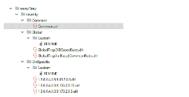
Trap Severity Mapping Rules can be Global or OID-specific. You can author and install your own Custom Global or Custom OID-specific Trap Severity Mapping Rules. Example Drools rules are provided within the <install_dir>/rules/snmpTrap/severity directory to help you in developing your own rules. These rules follow the Drools syntax (see https://www.drools.org/). Under <install_dir>/lib/xml/rules/snmpTrap/severity you will find a directory structure similar to the following:
Example Drools rules files
Global Trap Severity Mapping Rules
System-defined Global Trap Severity Mapping Rules are stored under the following directory:
<install_dir>/lib/xml/rules/snmpTrap/severity/Global
Custom Global Trap Severity Mapping Rules are stored under the following directory:
<install_dir>/lib/xml/rules/snmpTrap/severity/Global/Custom
All Custom Global rules and System-defined Global rules are merged and evaluated together as a single rule base. As such, Custom Global rules must follow the following:
• Critical rules must be defined with a salience from 5000 to 5999
• Major rules must be defined with a salience from 4000 to 4999
• Minor rules must be defined with a salience from 3000 to 3999
• Info rules must be defined with a salience from 2000 to 2999
• Clear rules must be defined with a salience from 1000 to 1999
OID-specific Severity Mapping rules
Filenames for the OID specific rules must be named with the dotted notation of the specific Trap OID (excluding the leading dot): for example, 1.3.6.1.4.1.9.9.43.2.0.1.drl.
System-defined OID-specific Trap Severity Mapping rules are stored under the following directory:
<install_dir>/lib/xml/rules/snmpTrap/severity/OidSpecific
Custom OID-Specific Rules are stored under the following directory:
<install_dir>/lib/xml/rules/snmpTrap/severity/OidSpecific/Custom
Custom OID-Specific Rules fire independently and above the salience convention is optional.
Authoring SNMP Trap management rules
The Common.drl file defines common variables, imports, and functions that can be shared by all rules. Common.drl includes the following useful functions for creating Trap Severity Mapping rules:
• Get Trap OID:
Syntax: SnmpTrapProcessor.getTrapOID(evalObj.getPdu())
• Trap VARBIND match/compare to Regular Expression.
Any VAR type can use this but pay attention to the escape of '.' if Regex includes the OID)
Syntax: SnmpTrapProcessor.trapVarBindValueMatches(PDU, OID, RegExp)
Example:
SnmpTrapProcessor.trapVarBindValueMatches(evalObj.getPdu(), ".1.3.6.1.4.1.9.9.43.1.1.6.1.4", ".*running|3.*")
• Trap VARBIND numerical value compared to a threshold.
Counter, Counter64, TimeTick, Int, Enum, Gauge can all be converted to a long value)
Syntax: SnmpTrapProcessor.getTrapVarBindNumericalValue(PDU, OID)
Example:
SnmpTrapProcessor.getTrapVarBindNumericalValue(evalObj.getPdu(), ".1.3.6.1.4.1.9.9.156.1.10.1") <= 3
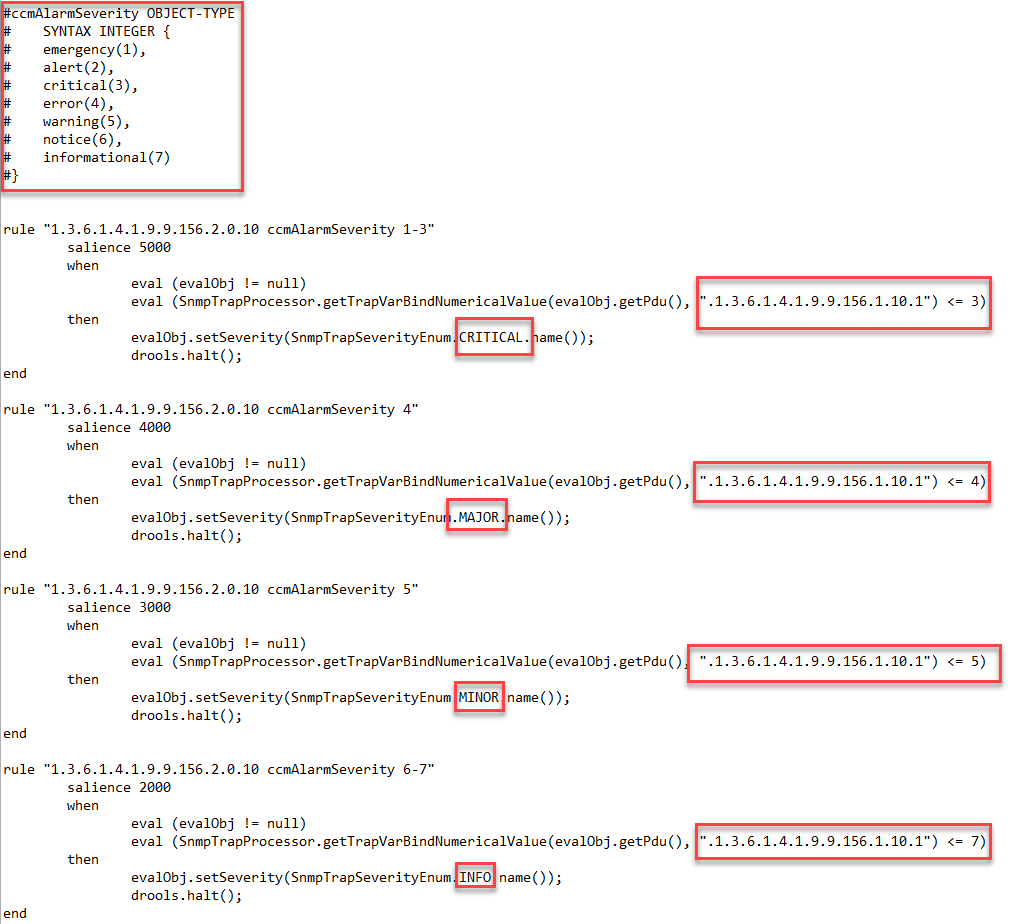
The following is an example of a trap management rule where the trap itself contains an embedded severity and the rule evaluates the internal trap severity and maps it to a NetIM trap severity value:
SNMP trap management rules file
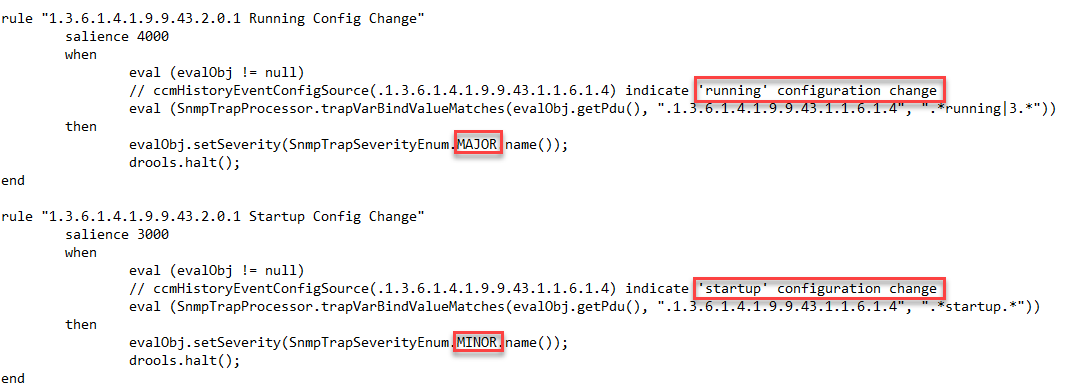
The following is an example of a rule that processes a configuration change trap. In the rule, if the change is to the running-config, then you map that to a severity of Major. If the change is to the startup-config, then you map that to a severity of minor:
Example of a configuration change rule
SNMP Trap management rule triggering
All the rules files will be loaded into the trap severity rules system as multiple rule bases. For any received trap, up to 3 rule bases may be triggered. The following rules bases are identified:
• Custom OID-specific Rules Base
– Common.drl plus each file under the directory OidSpecific/Custom only applicable to the particular trap OID.
• System-Defined OID-specific Rules Base
– Common.drl plus each file under the directory OidSpecific/ only applicable to the particular trap OID.
• Global Rules Base
– Common.drl plus each rule file under the directory Global/* applicable to all traps turned on/off per trap OID based on "useGlobalRule" setting in trapDefaultSettings.csv.
When a new rule is added to any rules base the NetIM core services should be restarted to update the rules base.