Configuring alert suppression expiry types
With alert suppression expiry types, you can control the duration of a suppression request. Rules with time-based expiry are active until a specific time is reached. Rules with event-based expiry automatically expire when the event that triggered the alert goes away – i.e., when the metric value returns to normal for a specific profile, object and metric.
With these expiry options, two types of suppression rules can be configured:
Time-based:
• The current matching alert will be immediately suppressed.
• Similar future alerts will be suppressed until the expiration time is reached.
• The rule will be automatically deleted after the expiration time has passed.
Event-based:
• The current matching alert is suppressed and will stay suppressed until it returns to normal.
• Similar future alerts will not be suppressed.
• The rule will be automatically deleted after the associated alert returns to normal.
About time-based suppression
When time-based suppression rules are applied, alerts for the same <Profile, Object, Metric Class, Metric Field> will automatically be suppressed until the time when the rule expires. In the example below, Alert #2 is for the same <Profile, Object, Metric Class, Metric Field> as Alert #1 and is automatically suppressed by the time-based rule. When the rule expires, Alert #2 will become active and its associated notification messages will be sent.
Time-based example
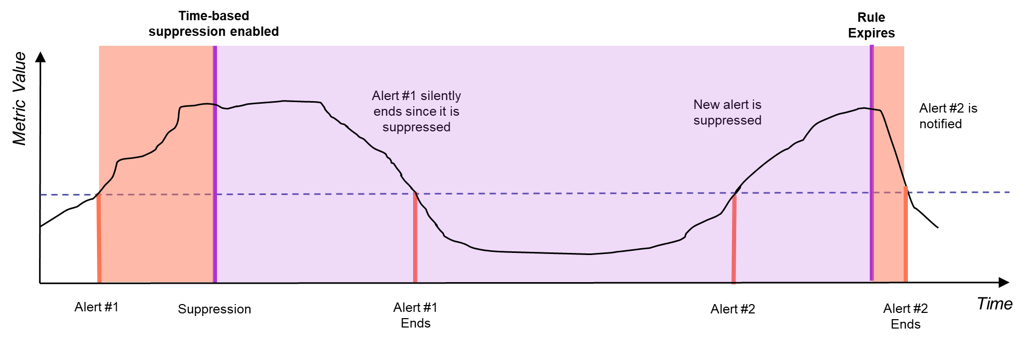
The time-based suppression rules can be useful for ignoring repetitive conditions for a specific amount of time – e.g., ignoring an over-utilized device until the end of the next maintenance window.
About event-based suppression
When event-based suppression rules are applied, the rule only applies to a specific alert – i.e., alerts matching <First Seen Timestamp, Profile, Object, Metric Class, Metric Field>. When a similar violation occurs, a new alert will be generated and will not be suppressed automatically. In the example below, the suppression rule is automatically removed when Alert #1 returns to normal. Thus, when the metric value later exceeds the threshold for the same object, a new active alert is generated, and any associated notification messages will be sent.
Event-based example
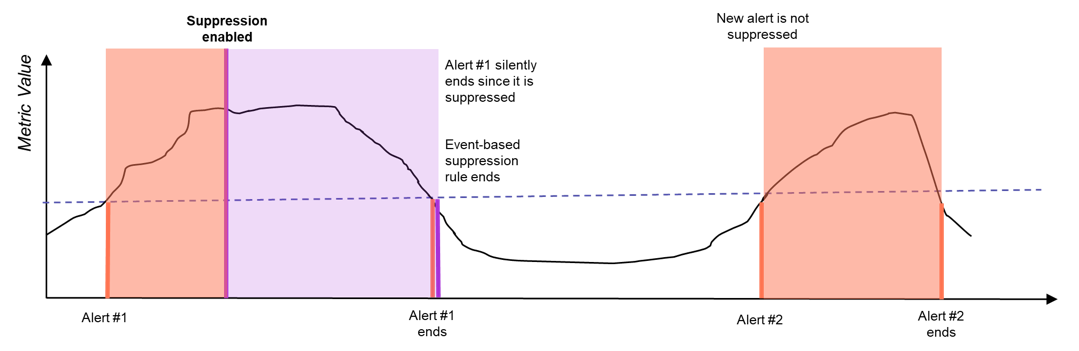
Event-based suppression can be used to implement “alert acknowledgment” where a specific anomaly can be acknowledged and then hidden from web UI and from notification messages.