Configuring an alert profile
To access the Alerts Profile page, choose Configure > All Settings > Alert: Alert Profiles. You are presented with a list of all existing alert profiles and their attributes, as well as the ability to create new alert profiles and edit and delete existing alert profiles.
The Create Alert Profile and Edit Alert Profile pages are identical and allow you to create and edit alert profiles in a similar way to the Alerts wizard.
Creating an alert profile
To create an alert profile, click the Add link, as shown in the following screen.
Alert Profiles screen

The Create Alert Profile screen appears, as follows.
Creating an alert profile
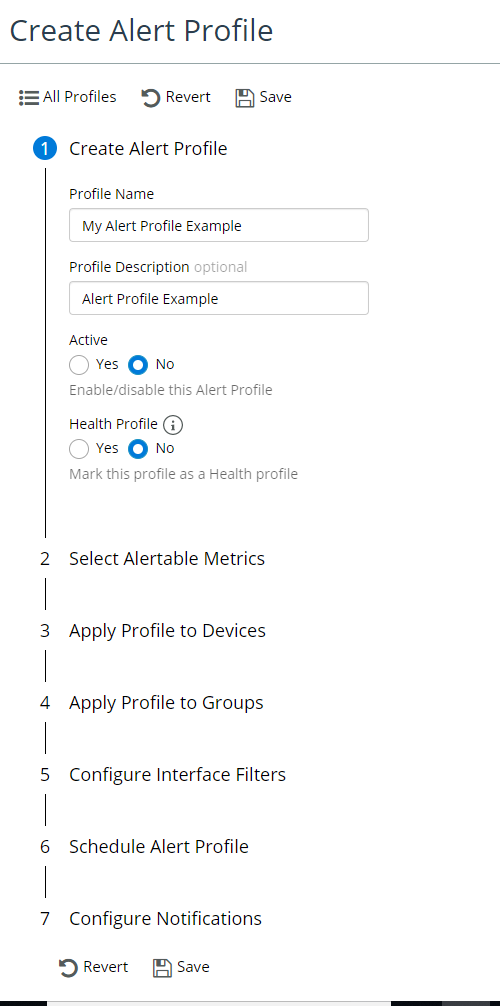
From this screen you can define alerts by specifying the following:
• Providing a Profile Name
• Providing an (Optional) Description
• Enabling or Disabling the profile
• Marking the alert profile as a health profile
Marking this profile as a Health profile indicates that the thresholds defined here will be used for the calculation of health for all devices associated with this profile. Devices can only be associated with a single Health profile at a time. Adding devices to a Health profile will remove them from all other Health profiles. Any devices not associated with a specific Health profile will use the default thresholds for health calculation.
• Selecting metrics to alert on, the comparison algorithms to use, and the threshold values for each severity
You can configure alerts on specific components as opposed to all components. For example, you can configure to alert on specific disks or specific CoS classes.
You can use syslog severity values to create minor, major, and critical alerts. For more information on syslog severity values, see
Syslog management.
• Scheduling the profile
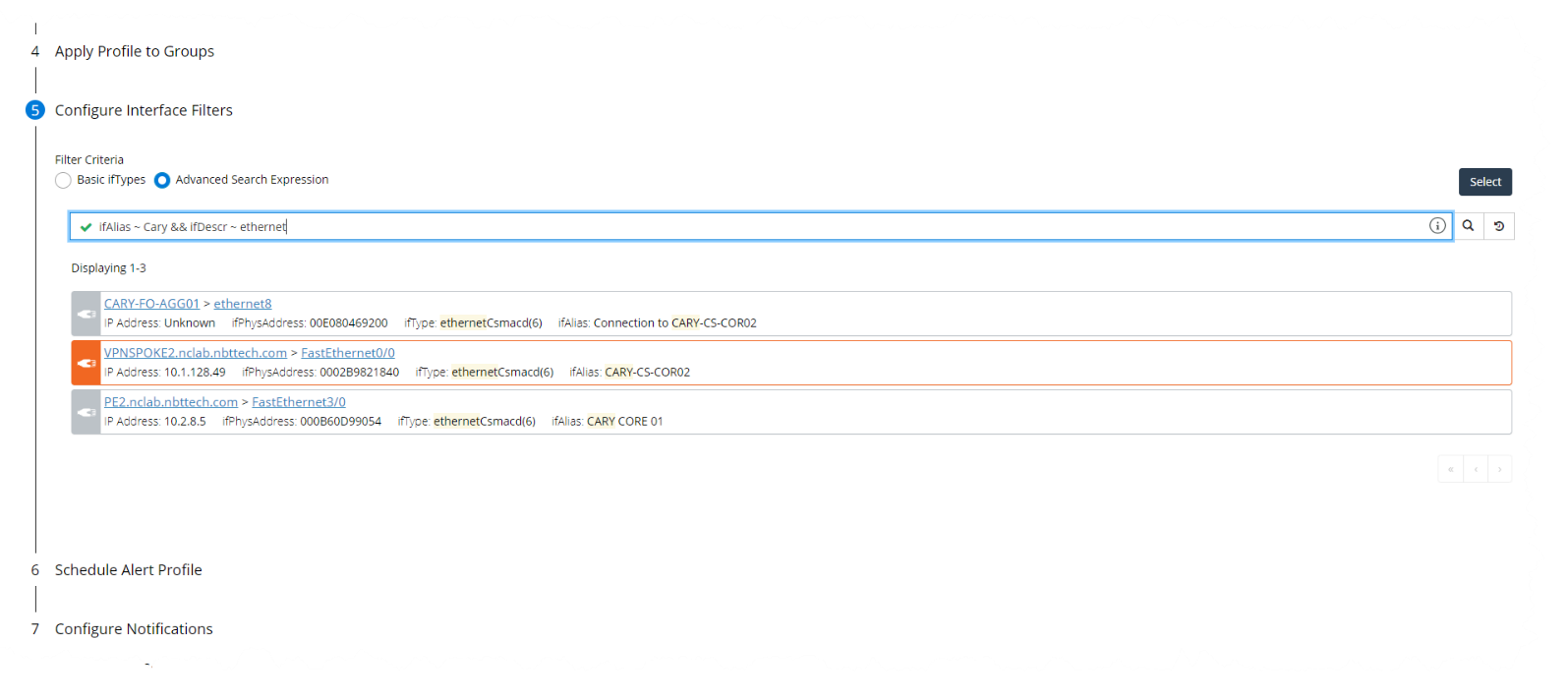
• Configuring interface filters
Configuring alert profiles supports the ability to add an Advanced Interface Filter. The Advanced Interface Filter includes all interface attributes, and is based on the Search Expression feature in the Search page and Report's page, and follows the same syntax, as shown in the following screen.
Defining alerts
• Configuring notifications
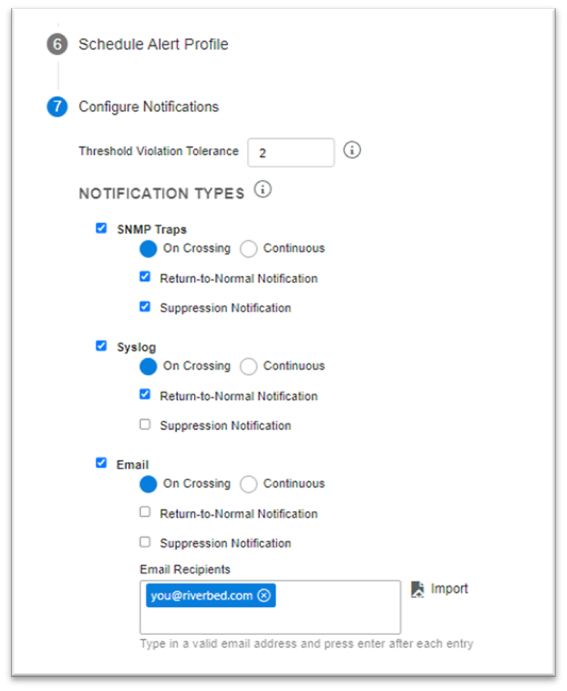
Use the “Threshold Violation Tolerance” to control how many samples must an alert be active for before a notification message for it is sent.
Enable notification mechanisms for the alert profile using the check boxes for each mechanism and provide any additional information as required for the selected mechanism, such as email recipient or slack webhook address.
Each notification mechanism (SNMP, email, Slack, and so on) will have its own set of check boxes for controlling the following notification messages:
– On Crossing mode: With this option selected, an initial notification message will be sent when an alert threshold is crossed and the threshold violation tolerance is reached. Further notifications are sent only on threshold crossings.
– Continuous mode: With this option selected, a notification message will be sent when the threshold violation tolerance is reached and for subsequent threshold violations. Notification messages are sent as long as the value is in violation of a threshold.
– Return-to-Normal Notification: With this option enabled, notification messages will be sent when the metric value no longer violates the threshold. It is enabled by default.
– Suppression Notification: With this option enabled, notification messages will be sent when an alert is explicitly suppressed via an action in the web UI. It is disabled by default.
Notification types
When you are satisfied with the alert definition, click Save.
Applying an alert profile to a device
Use the Alerts Profile page to create and/or modify alerts and apply them to devices as well as the Device Manager.
Perform the following procedures to add or remove an alert using the Device Manager.
To apply an alert profile
1. Log in as a user with administrative privilege.
2. Choose Configure > Device Manager.
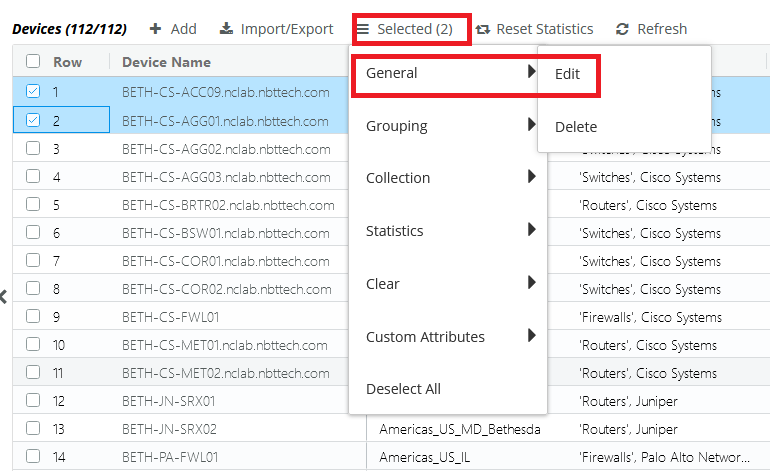
3. Select one or more device entries and click the Selected action menu, and then choose General > Edit, as follows.
Edit icon
The following Edit Device screen appears.
Edit Device pop-up
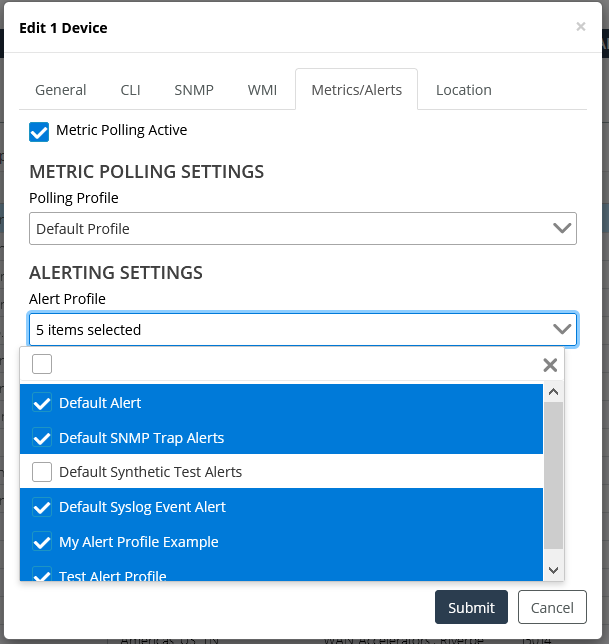
4. Select Alert Settings, and then check the alert profiles you want to apply.
5. Click Submit when you are satisfied with your selections.
6. Click OK in the confirmation dialog.
Changes to alerts are immediate and do not need to be saved.
To stop applying an alert profile to a device
1. Log in as a user with administrative privilege.
2. Choose Configure > Device Manager.
3. Select one or more device entries and click the Selected action menu, and then choose General > Edit, as follows.
Edit icon
The following Edit Device screen appears.
Edit Device pop-up
4. Click the Alert Profile option, and then uncheck the alert profiles that you want to stop applying.
5. Click Submit when you are satisfied with your selections.
Changes to alerts do not need to be saved.
Notification formats
Notifications contain the following information:
• Alert Name—User-specified name of the threshold alert.
• Alert Description—User-specified description of the alert.
• Alert Source—Riverbed product from which the notification originated (NetIM).
• sysName—The hostname of the device that caused the alert.
• Metric Class—The category of the metric.
• Metric—The specific metric involved.
• Metric Index—Information that helps identify the metric.
• Crossed At—The time the threshold was crossed.
• Initially Crossed At—The time the threshold was initially crossed. This field is displayed when the statistic crosses back below the threshold.
• Threshold—The threshold that was crossed.
• Observed—The observed statistic that crossed the threshold.
• Complete Sample—Varies based on metric class.
The preceding information corresponds to object IDs (OIDs) *.21359.2.491.10.1 to *.21359.2.491.10.14. See
SNMP Trap MIB definition.
The following sections show how this information is formatted for each type of notification.
SNMP Trap notification example
This example is the result of a CPU Utilization alert shown in a trap receiver with the SNMP Trap MIB definition loaded.
.iso.org.dod.internet.mgmt.mib-2.system.sysUpTime.0:TimeTicks:0 hours, 33 minutes, 2 seconds.:
.iso.org.dod.internet.6.3.1.1.4.1.0:Object ID:.1.3.6.1.4.1.21359.2.1.491.0.2:
.iso.org.dod.internet.private.enterprises.opnettechnologies.opnetMib.opnetGenericInfo.opnetGenericTrapVars.opnetComponentInfo.opnetAlertComponentTable.opnetAlertComponentEntry.opnetAlertComponentOperator.1:5:
.iso.org.dod.internet.private.enterprises.opnettechnologies.opnetMib.opnetGenericInfo.opnetGenericTrapVars.opnetAlertSeverity:minor:
.iso.org.dod.internet.private.enterprises.opnettechnologies.opnetMib.opnetGenericInfo.opnetGenericTrapVars.opnetAlertDesc:CPU Util Over 5 Minutes:
.iso.org.dod.internet.private.enterprises.opnettechnologies.opnetMib.opnetGenericInfo.opnetGenericTrapVars.opnetAlertProfileName:CPU Util:
.iso.org.dod.internet.private.enterprises.opnettechnologies.opnetMib.opnetGenericInfo.opnetGenericTrapVars.opnetAlertName:CPU Util:
.iso.org.dod.internet.private.enterprises.opnettechnologies.opnetMib.opnetGenericInfo.opnetGenericTrapVars.opnetComponentInfo.opnetAlertComponentTable.opnetAlertComponentEntry.opnetAlertComponentCriticalThreshold.1:75:
.iso.org.dod.internet.private.enterprises.opnettechnologies.opnetMib.opnetGenericInfo.opnetGenericTrapVars.opnetProfileId:1:
.iso.org.dod.internet.private.enterprises.opnettechnologies.opnetMib.opnetGenericInfo.opnetGenericTrapVars.opnetComponentInfo.opnetAlertComponentTable.opnetAlertComponentEntry.opnetAlertComponentStateID.1:1:
.iso.org.dod.internet.private.enterprises.opnettechnologies.opnetMib.opnetGenericInfo.opnetGenericTrapVars.opnetAlertId:1:
.iso.org.dod.internet.private.enterprises.opnettechnologies.opnetMib.opnetGenericInfo.opnetGenericTrapVars.opnetComponentInfo.opnetAlertComponentTable.opnetAlertComponentEntry.opnetAlertComponentMajorThreshold.1:50:
.iso.org.dod.internet.private.enterprises.opnettechnologies.opnetMib.opnetGenericInfo.opnetGenericTrapVars.opnetComponentInfo.opnetAlertComponentTable.opnetAlertComponentEntry.opnetAlertComponentMetricValue.1:41:
.iso.org.dod.internet.private.enterprises.opnettechnologies.opnetMib.opnetGenericInfo.opnetGenericTrapVars.opnetSysName:NYCCSBSW01.opnet.com:
.iso.org.dod.internet.private.enterprises.opnettechnologies.opnetMib.opnetGenericInfo.opnetGenericTrapVars.opnetAlertSampleData.opnetSampleDataTable.opnetSampleDataEntry.opnetMetricName.1:cpuIndex:
.iso.org.dod.internet.private.enterprises.opnettechnologies.opnetMib.opnetGenericInfo.opnetGenericTrapVars.opnetAlertSampleData.opnetSampleDataTable.opnetSampleDataEntry.opnetMetricDescription.2:User friendly name of CPU:
.iso.org.dod.internet.private.enterprises.opnettechnologies.opnetMib.opnetGenericInfo.opnetGenericTrapVars.opnetAlertSampleData.opnetSampleDataTable.opnetSampleDataEntry.opnetMetricName.3:cpuUtilType:
.iso.org.dod.internet.private.enterprises.opnettechnologies.opnetMib.opnetGenericInfo.opnetGenericTrapVars.opnetAlertSampleData.opnetSampleDataTable.opnetSampleDataEntry.opnetMetricDescription.1:The physical index of the CPU:
.iso.org.dod.internet.private.enterprises.opnettechnologies.opnetMib.opnetGenericInfo.opnetGenericTrapVars.opnetAlertSampleData.opnetSampleDataTable.opnetSampleDataEntry.opnetMetricName.2:cpuName:
.iso.org.dod.internet.private.enterprises.opnettechnologies.opnetMib.opnetGenericInfo.opnetGenericTrapVars.opnetAlertSampleData.opnetSampleDataTable.opnetSampleDataEntry.opnetMetricName.4:cpuUtil:
.iso.org.dod.internet.private.enterprises.opnettechnologies.opnetMib.opnetGenericInfo.opnetGenericTrapVars.opnetAlertSampleData.opnetSampleDataTable.opnetSampleDataEntry.opnetMetricIsIndex.2:2:
.iso.org.dod.internet.private.enterprises.opnettechnologies.opnetMib.opnetGenericInfo.opnetGenericTrapVars.opnetAlertSampleData.opnetSampleDataTable.opnetSampleDataEntry.opnetMetricDisplayName.3:Object Identifier:
.iso.org.dod.internet.private.enterprises.opnettechnologies.opnetMib.opnetGenericInfo.opnetGenericTrapVars.opnetAlertSampleData.opnetSampleDataTable.opnetSampleDataEntry.opnetMetricIsIndex.1:1:
.iso.org.dod.internet.private.enterprises.opnettechnologies.opnetMib.opnetGenericInfo.opnetGenericTrapVars.opnetAlertSampleData.opnetSampleDataTable.opnetSampleDataEntry.opnetMetricDisplayName.2:Name of CPU:
.iso.org.dod.internet.private.enterprises.opnettechnologies.opnetMib.opnetGenericInfo.opnetGenericTrapVars.opnetComponentInfo.opnetAlertComponentTable.opnetAlertComponentEntry.opnetAlertComponentStartTime.1:131532909678:
.iso.org.dod.internet.private.enterprises.opnettechnologies.opnetMib.opnetGenericInfo.opnetGenericTrapVars.opnetAlertSampleData.opnetSampleDataTable.opnetSampleDataEntry.opnetMetricDisplayName.1:CPU Index Number:
.iso.org.dod.internet.private.enterprises.opnettechnologies.opnetMib.opnetGenericInfo.opnetGenericTrapVars.opnetAlertSampleData.opnetSampleDataTable.opnetSampleDataEntry.opnetMetricIsIndex.4:2:
.iso.org.dod.internet.private.enterprises.opnettechnologies.opnetMib.opnetGenericInfo.opnetGenericTrapVars.opnetAlertSampleData.opnetSampleDataTable.opnetSampleDataEntry.opnetMetricIsIndex.3:1:
.iso.org.dod.internet.private.enterprises.opnettechnologies.opnetMib.opnetGenericInfo.opnetGenericTrapVars.opnetTargetInfo.opnetTargetDeviceID:906:
.iso.org.dod.internet.private.enterprises.opnettechnologies.opnetMib.opnetGenericInfo.opnetGenericTrapVars.opnetAlertSampleData.opnetSampleDataTable.opnetSampleDataEntry.opnetMetricClassName.3:CPU_UTIL:
.iso.org.dod.internet.private.enterprises.opnettechnologies.opnetMib.opnetGenericInfo.opnetGenericTrapVars.opnetComponentInfo.opnetAlertComponentTable.opnetAlertComponentEntry.opnetAlertComponentMetricClassName.1:CPU_UTIL:
.iso.org.dod.internet.private.enterprises.opnettechnologies.opnetMib.opnetGenericInfo.opnetGenericTrapVars.opnetAlertSampleData.opnetSampleDataTable.opnetSampleDataEntry.opnetMetricClassName.4:CPU_UTIL:
.iso.org.dod.internet.private.enterprises.opnettechnologies.opnetMib.opnetGenericInfo.opnetGenericTrapVars.opnetComponentInfo.opnetAlertComponentTable.opnetAlertComponentEntry.opnetAlertComponentStopTime.1:0:
.iso.org.dod.internet.private.enterprises.opnettechnologies.opnetMib.opnetGenericInfo.opnetGenericTrapVars.opnetAlertSampleData.opnetSampleDataTable.opnetSampleDataEntry.opnetMetricClassName.1:CPU_UTIL:
.iso.org.dod.internet.private.enterprises.opnettechnologies.opnetMib.opnetGenericInfo.opnetGenericTrapVars.opnetAlertSampleData.opnetSampleDataTable.opnetSampleDataEntry.opnetMetricClassName.2:CPU_UTIL:
.iso.org.dod.internet.private.enterprises.opnettechnologies.opnetMib.opnetGenericInfo.opnetGenericTrapVars.opnetAlertSampleData.opnetSampleDataTable.opnetSampleDataEntry.opnetSampleDataIndex.1:1:
.iso.org.dod.internet.private.enterprises.opnettechnologies.opnetMib.opnetGenericInfo.opnetGenericTrapVars.opnetAlertSampleData.opnetSampleDataTable.opnetSampleDataEntry.opnetSampleDataIndex.2:2:
.iso.org.dod.internet.private.enterprises.opnettechnologies.opnetMib.opnetGenericInfo.opnetGenericTrapVars.opnetAlertSampleData.opnetSampleDataTable.opnetSampleDataEntry.opnetSampleDataIndex.3:3:
.iso.org.dod.internet.private.enterprises.opnettechnologies.opnetMib.opnetGenericInfo.opnetGenericTrapVars.opnetComponentInfo.opnetAlertComponentTable.opnetAlertComponentEntry.opnetAlertComponentID.1:1:
.iso.org.dod.internet.private.enterprises.opnettechnologies.opnetMib.opnetGenericInfo.opnetGenericTrapVars.opnetAlertSampleData.opnetSampleDataTable.opnetSampleDataEntry.opnetSampleDataIndex.4:4:
.iso.org.dod.internet.private.enterprises.opnettechnologies.opnetMib.opnetGenericInfo.opnetGenericTrapVars.opnetComponentInfo.opnetAlertComponentTable.opnetAlertComponentEntry.opnetAlertComponentMetricName.1:cpuUtil5min:
.iso.org.dod.internet.private.enterprises.opnettechnologies.opnetMib.opnetGenericInfo.opnetGenericTrapVars.opnetAlertSampleData.opnetSampleDataTable.opnetSampleDataEntry.opnetMetricUnits.4:%:
.iso.org.dod.internet.private.enterprises.opnettechnologies.opnetMib.opnetGenericInfo.opnetGenericTrapVars.opnetPrimaryAddress:10.3.1.115:
.iso.org.dod.internet.private.enterprises.opnettechnologies.opnetMib.opnetGenericInfo.opnetGenericTrapVars.opnetAlertSampleData.opnetSampleDataTable.opnetSampleDataEntry.opnetSampleMetricValue.1:0:
.iso.org.dod.internet.private.enterprises.opnettechnologies.opnetMib.opnetGenericInfo.opnetGenericTrapVars.opnetAlertSampleData.opnetSampleDataTable.opnetSampleDataEntry.opnetSampleMetricValue.4:41:
.iso.org.dod.internet.private.enterprises.opnettechnologies.opnetMib.opnetGenericInfo.opnetGenericTrapVars.opnetSource:Net:
.iso.org.dod.internet.private.enterprises.opnettechnologies.opnetMib.opnetGenericInfo.opnetGenericTrapVars.opnetAlertSampleData.opnetSampleDataTable.opnetSampleDataEntry.opnetSampleMetricValue.3:cpmCPUTotal5minRev:
.iso.org.dod.internet.private.enterprises.opnettechnologies.opnetMib.opnetGenericInfo.opnetGenericTrapVars.opnetComponentInfo.opnetAlertComponentTable.opnetAlertComponentEntry.opnetAlertComponentMinorThreshold.1:25:
.iso.org.dod.internet.private.enterprises.opnettechnologies.opnetMib.opnetGenericInfo.opnetGenericTrapVars.opnetAlertSampleData.opnetSampleDataTable.opnetSampleDataEntry.opnetMetricDescription.3:Where appropriate, this will be the name of the requested CPU utilization type.:
.iso.org.dod.internet.private.enterprises.opnettechnologies.opnetMib.opnetGenericInfo.opnetGenericTrapVars.opnetAlertSampleData.opnetSampleDataTable.opnetSampleDataEntry.opnetMetricDescription.4:Percent utilization as received from the device:
.iso.org.dod.internet.private.enterprises.opnettechnologies.opnetMib.opnetGenericInfo.opnetGenericTrapVars.opnetComponentInfo.opnetAlertComponentTable.opnetAlertComponentEntry.opnetAlertComponentMetricDisplayName.1:CPU Utilization 5 min:
.iso.org.dod.internet.private.enterprises.opnettechnologies.opnetMib.opnetGenericInfo.opnetGenericTrapVars.opnetTargetInfo.opnetTargetInfoOeID:670004:
.iso.org.dod.internet.private.enterprises.opnettechnologies.opnetMib.opnetGenericInfo.opnetGenericTrapVars.opnetTargetInfo.opnetTargetInfoMetricClassName:CPU_UTIL:
.iso.org.dod.internet.private.enterprises.opnettechnologies.opnetMib.opnetGenericInfo.opnetGenericTrapVars.opnetTargetInfo.opnetTargetInfoMetricClassDisplayName:CPU Utilization:
.iso.org.dod.internet.private.enterprises.opnettechnologies.opnetMib.opnetGenericInfo.opnetGenericTrapVars.opnetAlertSampleData.opnetSampleDataTable.opnetSampleDataEntry.opnetMetricDisplayName.4:CPU Utilization:
.iso.org.dod.internet.private.enterprises.opnettechnologies.opnetMib.opnetGenericInfo.opnetGenericTrapVars.opnetComponentInfo.opnetAlertComponentTable.opnetAlertComponentEntry.opnetAlertComponentMetricClassDisplayName.1:CPU Utilization:
Syslog notification example
CRITICAL - The following alert has been crossed with critical severity: Alert Name: CPU Alert > 50%
Alert Description: trap
Alert Source: Riverbed NetIM
sysName:WDCCSDST01.lab.opnet.com
primaryAddress:10.1.128.2
The following alert details were observed:
Metric Class: CPU Utilization
Metric:CPU Utilization 5 min
Metric Index: cpuIndex: 0, cpuUtilType: cpmCPUTotal5minRev
Crossed at: Mon Apr 11 14:55:10 EDT 2011
Threshold: > 50%
Observed: 58%
Complete Sample:
CPU Index Number: 0
Name of CPU:
Object Identifier: cpmCPUTotal5minRev
CPU Utilization: 58
E-Mail notification example
The following alert has been crossed with minor severity:
Alert Name: Alert 1
Alert Description:
Alert Source: Riverbed NetIM
sysName:ATLCSACC01.lab.opnet.com
primaryAddress:10.1.18.9
The following alert details were observed:
Metric Class: IP SLA Latency
Metric: Roundtrip Latency
Metric Index: targetIP: 10.2.8.9, protocol: ipIcmpEcho
Crossed at: Thu Apr 07 14:18:50 EDT 2011
Threshold: > 100 milliseconds
Observed: 191 milliseconds
Complete Sample:
Target Address: 10.2.8.9
Protocol: ipIcmpEcho
Roundtrip Latency: 191
Minimum Roundtrip Latency:
Maximum Roundtrip Latency:
Suppression notification messages contain fields that indicate the message is for a suppressed alert.
Suppression notification
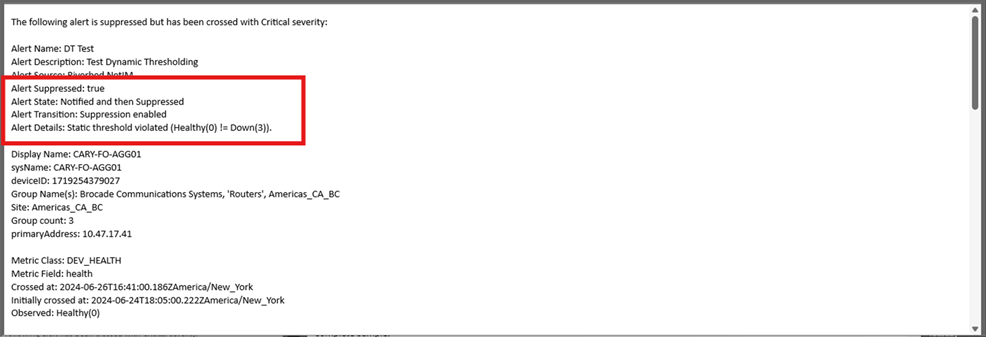
These controls can be used to reduce the number of notification messages to only the most important ones, or to make sure that third-party alert tracking systems are synchronized with NetIM.
SNMP Trap MIB definition
To find the latest SNMP Trap MIB definition, go to <install-dir>/lib/mibs/third_party/opnet.